Import HDX
Hazid Data Exchange (HDX) files are used to store and move individaul drawings between projects, where a full database import/export is not required.
The first step of the import is to define the source and destination locations
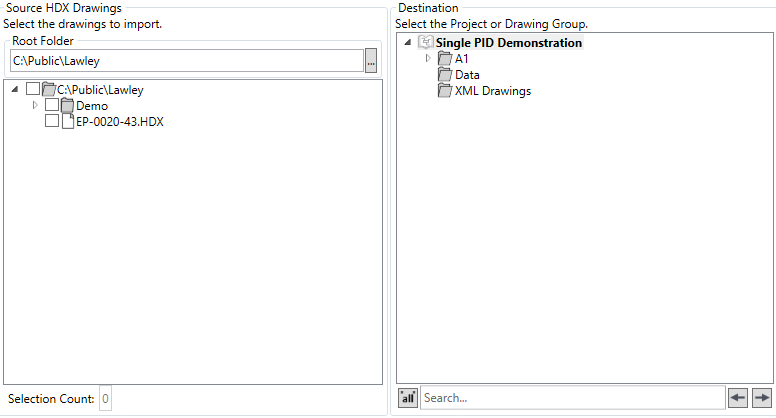
The system remebers the last location the user imported from, a new source location can be selected via the  button, Folders/HDX files to import are selected via the checkboxes
The destination folder to import to is selected via the right hand tree.
The next step is to select the import options

There are four import options
- Import Structure -Imports the drawing in the same folder structure as it exists in the source
- Create Source Folder Root in Destination - Creates the source structure in the project root
- Skip Existing - Skips already imported drawings
- Version Drawing - Versions the drawing as part of the import process (drawings imported from HDX can be worked on graphically in the Aurelia tool)
The Drawing Conversion Options should be set next
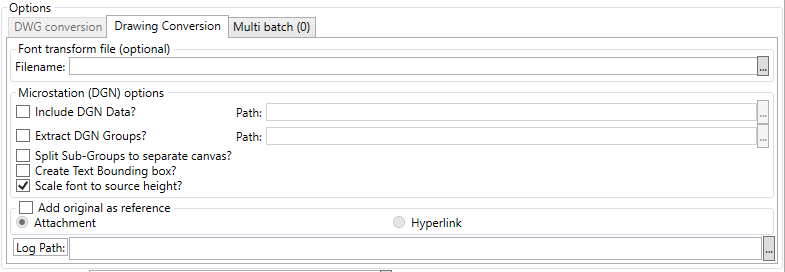
The two options that can be ultilised for HDX import
- Font Transform - Allows the user to specify a new font for the imported drawing, by slecting it via the broswe button
- Add Original as reference - Allows the user to add the original HDX file as a reference to the imported data, as an attachemnt or hyperlink with a log path available to be specified
Multi Batch Operations can be configured via the  button

The Diagnostics, concurrency and writing the configuration rule results to the database can also be set via the checkboxes

The  button imports the drawing(s),
  closes the dialog.