Equipment Port Mapping
Equipment Ports are the nozzles you see on a P&ID. Hazid Integrity translates these to process ports to allow the system to build a process model from the P&IDs. This means that the equipment rather than having single piping points or nozzle numbers know that the process enters and exits the item at certain positions or that some nozzles have a different purpose than others, such as gas or liquid inlets.
You can Port map individual ports by selecting them in the list or multiple ports can be mapped at one time using Shift or Ctrl buttons to multiple select. Only consistent ports can be mapped in this way.
When you have selected a Port all available Ports for the model are displayed in the right hand panel.
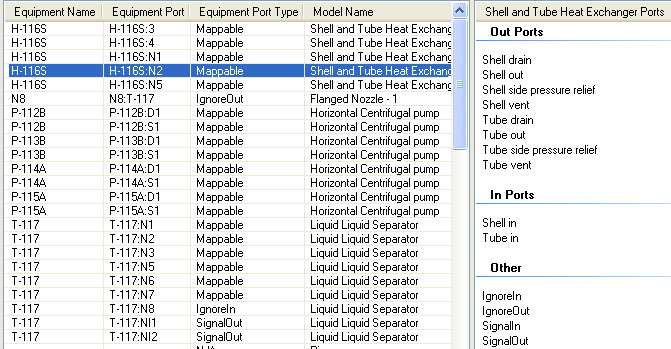
All Ports as specified in the Model Library are available to be mapped along with system ports such as ,IgnoreIn or SignalIn.
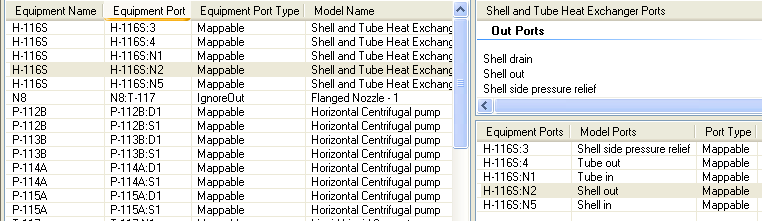
The Panel Bellow shows all available Ports for the selected equipment
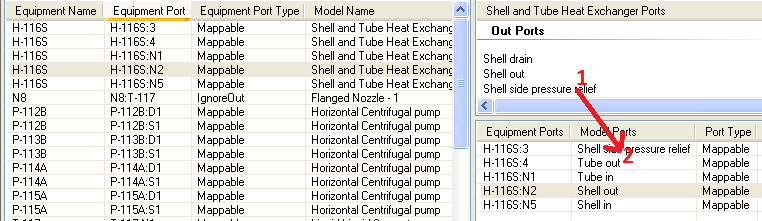
To map the port you may drag and drop the desired Port(1) onto the Equipment Port(2)

You may also Port Map any other Equipment Port for the item by dragging to the panel
Right clicking on any Equipment Port allows you to also Map the desired Port as well as some additional actions
- Set Port - Allows you to set the Port of the selected Equipment
- Reset Mapping - Allows you to reset the equipment Port back to Mappable
- Highlight Selected - Highlights the selected equipment Port and connected items
- Select All Equipment Ports - Selects all of the equipment Ports for the selected Equipment
- Select All Selects all equipment Ports
Hazid Integrity will still run with equipment Ports unmapped but may limit the ability of Safety Analysis or P&ID Integrity Rules