Run Model Configuration Rules
Model Configuration Rules run on every item that they can be run on, in the tree at or below the point where the user selected to run them. For information on Model Configuration Rule creation, see Model Configuration Rules.
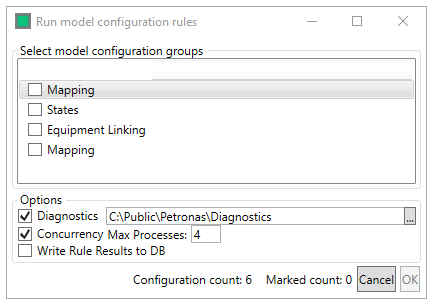
The user uses the checkboxes to select the configuration rules they wish to run, the rules are run sequentially moving down the list based upon the users selections.
The Options are used to enable diagnostics, set the diagnostic output location, define the number of concurrent processes to run the rules as and to select to write the results of the trigger rules to the database for diagnostic review.
The  button begins the rule run, clicking
  exits the window.