Multi Batch Operations
Multi Batch Operations allows the user to select a pre-defined xml file (or files) of batch operation instructions to be carried out on the drawing(s) as part of the import process. The batch files are created in the drawing cleanup tool
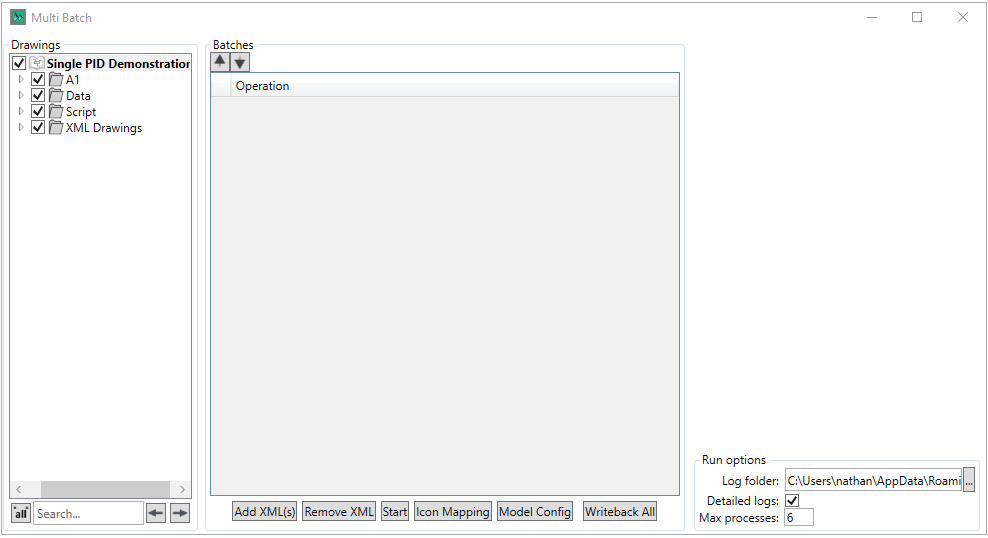
The Drawings panel is used to select the Drawings/Drawing Groups the user wishes to run the Multi-batch operations on. The search panel can be used to search for a specific drawing/group, the  button is used to select/deselect all drawings and groups.
 button allows the user to select which batch xmls they wish to use
 button allows the user to remove their currently selected XML from the list
 button adds an icon mapping rule process instruction to the list, the icon mapping rules to run are selected via the checkboxes in the right panel shown above
 button adds a model configuration rule process instruction to the list, the model configuration rule groups to run are selected in the same manner as the icon mapping rule groups
 button adds an operation to writeback all external data
 button allows the user to change the order in which the multi batch operations are run
The Run options box allow the user to define the logging and the number of CPU processes the multi batch operation will use
The  button starts the batch