Change SPPID Piping Symbol
Piperuns in SPPID can have the symbol that is displayed for them in the SPPID application bulk changed via the Chang SPPID Piperun symbol wizard
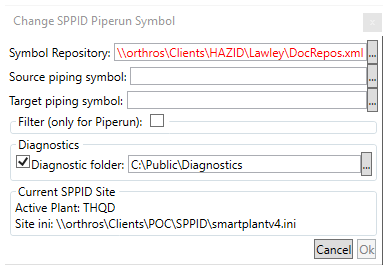
The user needs to enter the location of the Symbol Repository xml file, the source piping .sym file and the target piping .sym file, either by pasting the file location/file into the relevant box or by using the  button
The filter checkbox allows the user to enter a property filter that has to be matched for the symbol change to take place

The user needs to spieify the property, the alias and then enter a Regular Expression that should be matched by the data against the property in order for the change to take place.
The diagnostics checkbox is used to turn the diagnostics on or off, when enabled, they are written to the specified location.
The "Current SPPID Site" box is for information only, and displayed the SPPID site that the machine is currently connected to.
The  button begins the rule run, clicking
  exits the window.