Configurable Reports
Configurable SPI Reports are different from SPPID and SPEL reports because they can be configured to show compliance data for different rule types. Each report shows the overall compliance percentage of each rule type and the compliance of each rule group. The report also shows a table of detailed compliance data. The table displays whether an item is compliant in each rule type. A "YES" in a cell represents a compliant item. A "NO" in a cell represents a non-compliant item. The item is either compliant or non-compliant based on the compliance threshold set for the rule type.
There are a total of six configurable SPI Reports:

There are four options for each SPI Report:

The following three options are standard options avialable for every report in Hazid Integrity:
- View - Displays the report in the Report Viewer
- Update - Updates the Report. For example if you import an addtional drawing to a project, then to ensure that the latest report includes data from the new drawing you should select Update
- Export to - Allows you to export the report to an Excel, PDF or Word document
The "Setup" option allows you to configure the report to show the compliance data for different rule types. For example selecting "Setup" for the "Wiring" report will display a select list of rule types currently imported into your project:
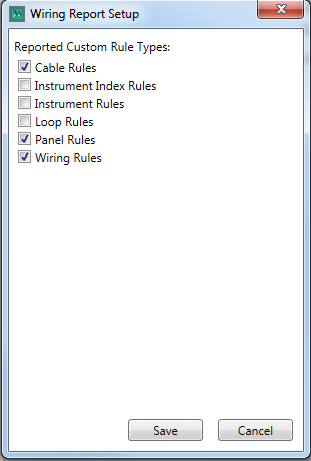
Here you can select the rule types which relate to the "Wiring" Report: Cable Rules, Panel Rules and Wiring Rules.
Selecting "Save" and then "Update" from the report options will generate the configured report:


Now selecting "View" will display the updated report with compliance data for the relevant rule types.