Update Project Symbol Mapping
Updating the Project Icon Mapping allows you to specify a number of different options. You can select multiple options to run simultaneously.
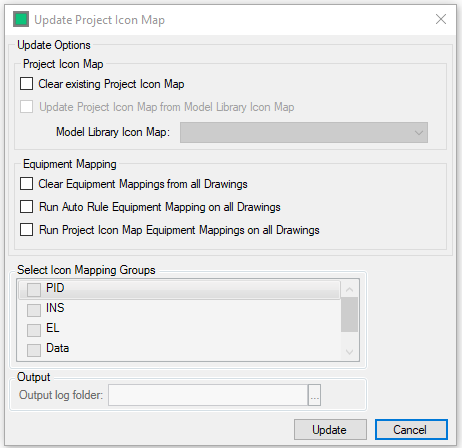
- Clear Existing Project Mapping - Will Clear all Project Icon mapping entered
- Update Project Icon Mapping from Model Library - Will Update the Project Icon Mapping with the selected Mapping from the Library. Only Project symbols without an existing mapping will be updated.
- Clear Equipment Mapping from all Drawings - Will clear all Equipment mappings from all drawings in your Project
- Run Auto Rule Equipment Mapping on all Drawings - Will Run the Rule Based Icon Mapping on all drawings in your Project
- Run Project Mapping on all Drawings - Will run Project Icon Mapping on all drawings in your Project
With "Run Auto Rule Equipment Mapping on all Drawings" the user is able to select the icon mapping rule groups they wish to run via the checkbox list.
The output folder selection allows the user to define the location to which the log files of the update will be written to with the  button
Select  to run the selected function.
Select  to close the from without making any changes