Default Property Editor
Default properties are data points that can be assigned to any model (or group of models) that are then applied automatically once an item has been mapped a model, e.g. assigning the max connections of a 2-way valve to be 2.
Default properties are defined in the Knowledge bank of a project and are accessed by opening the “Knowledge Bank” from the web application and right clicking the top of the model tree.
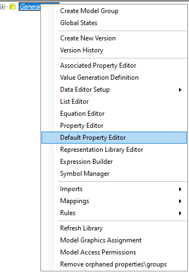
This will open the “Default Property Editor”:
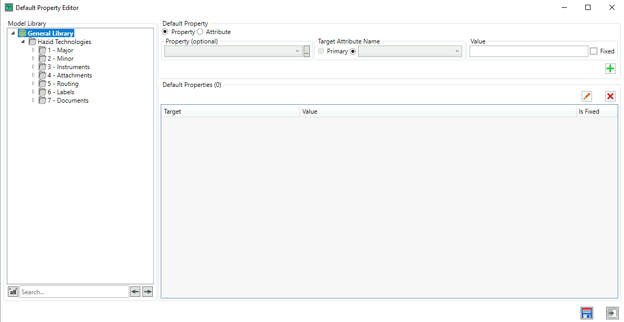
Add Property Data
Properties can be assigned to the group and/or on the model directly, properties repeated between groups and models will override from the parent group to the child model.
To start select the model or group from the model tree on the left:

Choose the property you would like to target from the right panel (if the property is aliased we can deselect “Primary” from the “Target Attribute Name” and select the applicable alias), define the value to be assigned to that property, then click the  button:

This will update the “Default Properties” list below with the values added:
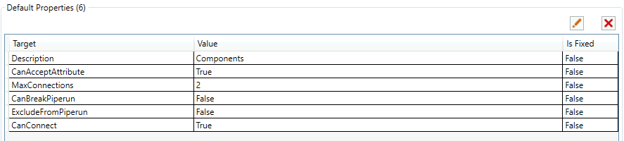
To commit your changes click the  button in the bottom right of the window or to close without committing the change press the
  button.
Edit Property Data
To edit an existing property select it from the list and click the  button. This will open the default property editor window:

Similar to adding a property we can update the field and target the primary or secondary aliases with the toggle and drop-down menu:
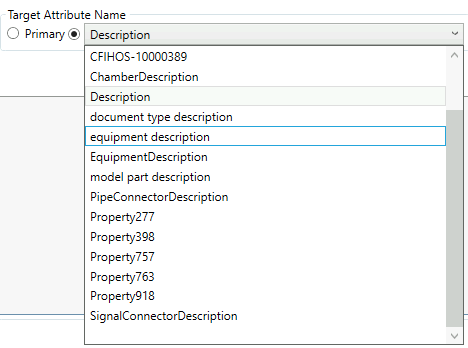
Update the value field as necessary and click the button to commit the changes or click the button to close the window without saving.
If the property is no longer required you can select it in the list and click the  button to remove the properties default value.