Model Version
To use a Hazid Model within a project it must be versioned. No items will be available to the Project that do not reside as a version in the library.
The Model Version form holds all of the information for the current version.
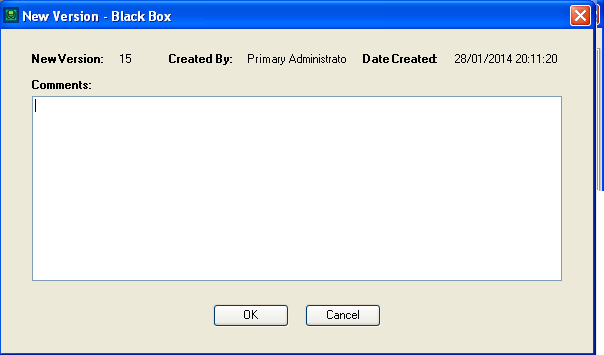
- New Version - The Version number that will be created in this version of the Model
- Created By - The logged in User who is creating the version
- Date Created - The Date that the version has been created
- Comments - Any Comments for the version. This is a mandatory field
Select  to start the versioning..
Select  to close the form without making a version.
Model Version History
You can review past versions and rollback if necessary to any previous version of the Hazid Model. This will roll back all information stored in the model to the previous version.
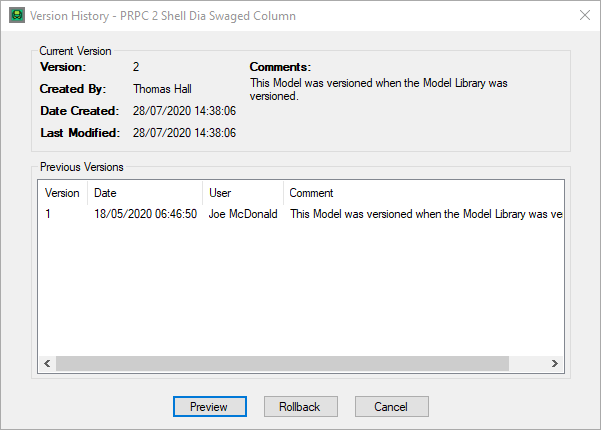
The Information is displayed in two sections
Current Version
- Version - The current Version number
- Created By - The logged in User who created the version
- Date Created - The Date that the version was created
- Comments - Any Comments for the version.
Previous Versions
- Version - The Version number
- Date - Date the version was created
- User - User who created the version
- Comments - Any Comments for the version.
To view a previous version of a model, select it in the list and click on the  button
To Rollback to a previous version select the desired version and select 
The version number is increased by one and the previous version becomes the new one.
Select to close the form without making any changes.