Model States
Creating Model States
Hazid Integrity stores extra information pertaining to the process or physical characteristics of equipment items. This can include the physical state of equipment, does a vessel include a steam jacket, the process state of equipment, running and standby equipment, the process configuration of the equipment, cold side of a heat exchanger, and the configuration of inline equipment, isolation, bypass, drain valves etc. This information is often not represented on the P&ID and as such the engineer must normally define these states manually.

All Model States which are not Global are stored at the Model Group Level for all immediate child Models of the Group.
To Create a state select  to enter a state name

Enter the state name in the box provided and Select Enter.
States are made up of Parameters which are the Process or Physical representation of the purpose of the state.

Enter a Parameter in the box provided and select Enter.
To add another Parameter select  . You can add as many Parameters to a state as you wish.
Double Click on a State Name or Parameter Name to Edit
To Delete a State or Parameter from a Model Group select the desired Item and select 
Select  go update the new Sates and Parameters to all child Hazid Knowledge Models.
Select  to close without committing any changes
Copy Model States
Model States can be copied from one group to another to allow you to keep consistency with State Names.
To copy Model States from another group select 
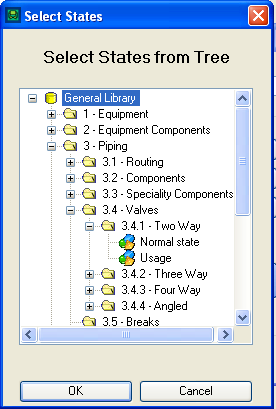
Browse the Model Tree till you reach your desired Model Group containing the states you wish to copy.
States are defined by the  Icon.
Icon.
Select the desired State and Select  to copy.
The states are now within your Model Group and can be edited as normal.
Select to quit the operation.