Briefcase Manager
The Briefcase Manager allows the user to Create, Delete, Edit and Download Briefcases of drawings - A briefcase of a drawing is all of the graphics and data for a drawing, exported from the main database in a manner that allows it to be worked on remotely and then seamlessly merged back into the database.
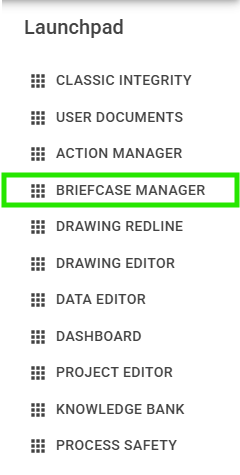
To create a Briefcase for a drawing, first navigate to the drawing page in Integrity and Open Briefcase Manager from the Launchpad.
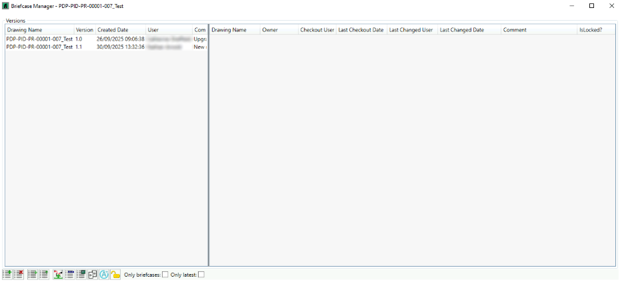
Upon opening Briefcase Manager, a list of versions of the selected drawing will be displayed in the left-hand pane, and the right-hand pane will be blank.
Toolbar
Briefcases have multiple uses, and Briefcase Manager allows for a number of different interactions with a selected briefcase, outlined below:
| Icon | Tooltip | Description |
|---|---|---|
 | Create Briefcase | |
 | Delete Briefcase | |
 | Download Briefcase | |
 | Upload Briefcase | |
 | Open Briefcase in Redline Mode | |
 | Edit Briefcase in Drawing Editor | |
 | Open Briefcase in Drawing Viewer | |
 | Compare Briefcase | |
 | Create Action | |
 | Rescue Locks |
Create Briefcase
In the left-hand pane, select the desired version of the drawing to create a Briefcase for. In most cases, this will be the most recent version.
With the desired version selected, click the button in the bottom toolbar.
This will open an optional prompt to add a comment, which can be used to identify or describe the briefcase.
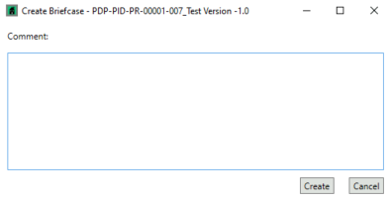
To create the Briefcase, click  or to cancel the creation click
  .
.
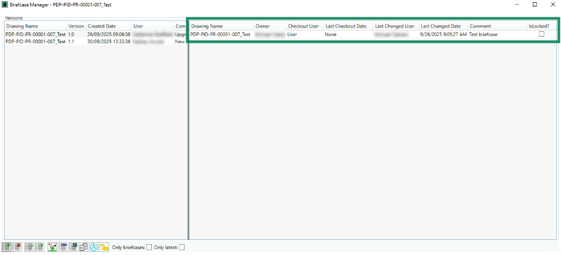
The newly created briefcase will now be visible and selectable in the right-hand pane.