Project Filter
The Project Filter is used to change which project level the Data Editor is open on. This allows a custom selection of drawings from different project groups to be displayed.
The Project Filter is accessed via the Project Filter tab, which is enabled via the Views Menu.
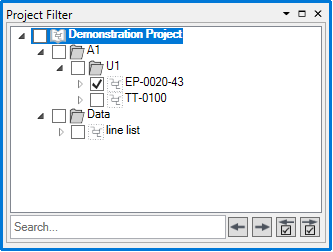
Model groups can be expanded with  . Checking the boxes next to the models and groups sets the filter to those models. The 'Search...' field is used to search for models by name. The
  buttons cycle between search results, and the
  buttons cycle between checked models and groups. To apply the filter, click
  button on the Data Editor toolbar.