References
The References panel is used to link external documents to items in the Data Editor. It is accessed via the References tab, which is enabled via the Views menu.
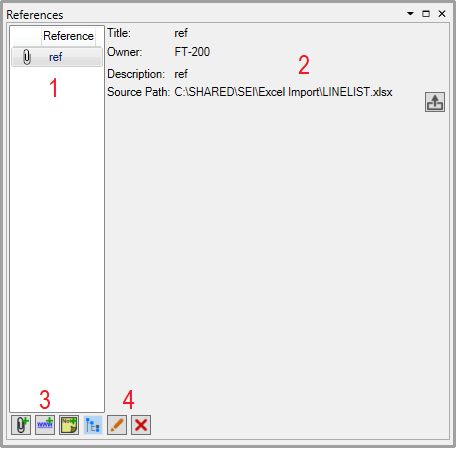
Reference List - When an item is selected on the grid, any attached references are listed here
Reference Details - Lists the title, parent equipment, description and file location of the attachment. Click
 to open the attachment.
Add Reference
 Add File - opens a window to add an attachment: The title and description can be entered in their respective fields. Click
  to browse for the file to attach. Click 'Save' to create the attachment.

 Add Link - opens a window to add a link: The title and description can be entered in their respective fields. Paste the URL into the Hyperlink field. Click 'Save' to create the reference.

 Add Note - opens a window to add a note: The title and description can be entered in their respective fields. Enter the text into the Note field. Click 'Save' to create the attachment.

Misc
 Show Parent References - Clicking this toggles whether references for linked parent items are also displayed.
 Edit Reference - Edit the selected reference.
 Delete Reference - Deletes the selected reference.