Creating Equipment
Equipment items can be added directly in the Data Editor. To add an item to the current drawing, click the  button on the toolbar. This opens the equipment creation window:
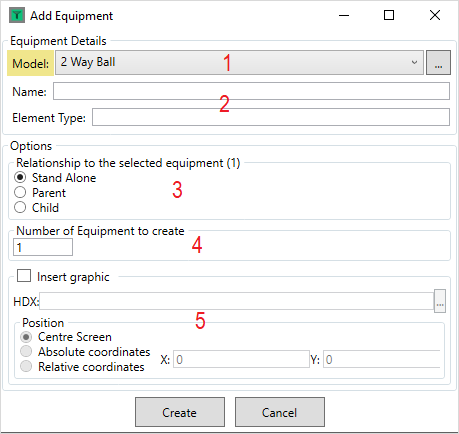
- Model - Select which model the equipment will have from the list, or click
 to open the model tree.
 - Name and Element Type - Enter the Equipment Name and Element Type properties
- Relationship - If an existing item is selected on the grid, the new equipment can be linked to it as a parent or child.
- Number - Entering a number will create multiple items of equipment
- Insert Graphic - This provides the option to add a symbol for the item to the current drawing. Select a .hdx of the symbol and specify the position in the drawing to place it.
Clicking 'Create' will add the item to the grid.