Batch Operation Options
The Batch Operations Panel is used to define how certain batch operations function, as well as the standard run options for the batch process, which are as follows

There are three selecitions here:
The log folder location, defined either by pasting/typing into the box or loacted via the  button.
The detailed log generation checkbox, checking it generates more detailed logs
The Maximum concurrent processes window (default 6) - this is the maximum number of processes that the batch processor will use, we recommend it be one less than the total number of threads available on the machine, setting it to "1" sets single threaded operation.
button.
The detailed log generation checkbox, checking it generates more detailed logs
The Maximum concurrent processes window (default 6) - this is the maximum number of processes that the batch processor will use, we recommend it be one less than the total number of threads available on the machine, setting it to "1" sets single threaded operation.
When certain operations are selected, their batch options will be displayed in a tab in the Batch Operation Options panel
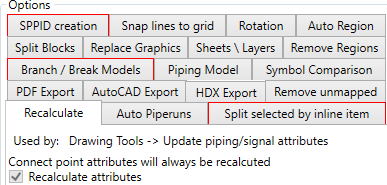
There are nineteen operations that have tabbed options
- Auto Piperuns Options Defined in the Auto Piperuns Tab
- Auto Property Bremiscellaneousmiscellaneousaks Options Defined in the Branch / Break Models Tab
- Auto Region Options Defined in the Auto Region Tab
- Auto Symbol Identification Options Defined in the Symbol Comparison Tab
- Calculate Hazid Rotation Options Defined in the Rotation Tab
- Create in SPPID - Database only Options Defined in the SPPID Creation Tab
- Export to AutoCAD Options Defined in the AutoCAD Export Tab
- Generate Branching Points Options Defined in the Branch / Break Models Tab
- Identify Centrelines Options Defined in the Piping Model Tab
- Output to HDX - Database only Options Defined in the HDX Export Tab
- Output to PDF Options Defined in the PDF Export Tab
- Remove Regions Options Defined in the Remove Regions Tab
- Replace Graphics Options Defined in the Replace Graphics Tab
- Set layer visibility Options Defined in the Sheets \ Layers Tab
- Snap Lines to Grid - Database Only Options Defined in the Snap lines to grid Tab
- Split Blocks Options Defined in the Split Blocks Tab
- Split Selected Pipe by Inline Items Options Defined in the Split selected by inline item Tab
- Update attributes from mapped models - Database only Options Defined in the Remove unmapped Tab
- Update piping/signal attributes Options Defined in the Recalculate Tab