Overall Scope Tab
The Overall Scope Tab Displays a grid with a summary of the analysed items broken down by Plant, Area and Unit. Items are separated into eight separate groups: Instrument Tags, Instrument Loop, Spec Sheets, Device Panel, Junction Box, Marshalling, Cables and Other. A number in a cell represents a particular number of items in a certain Unit:
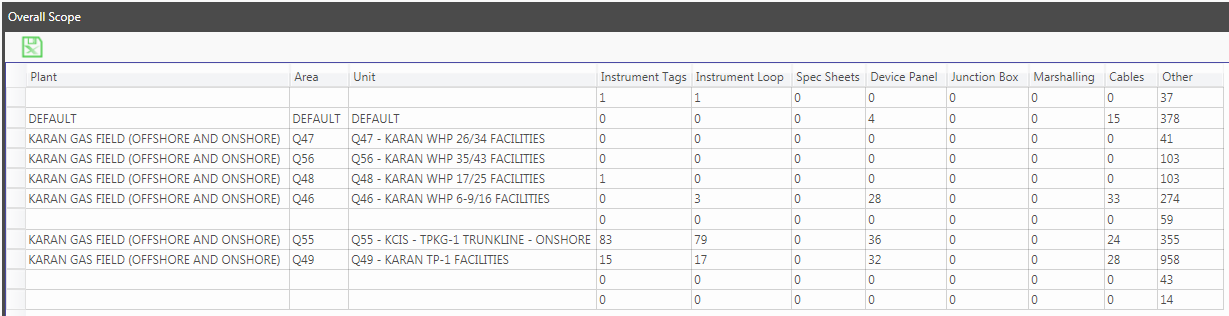
The user can export the Overall Scope grid to excel by selecting the Export to Excel button: 
The user can drill down to another grid displaying additional data for a particular group of items. For example double clicking the number "15" in the "Instrument Tags" column displays the following 15 tags in the "Q49 - KARAN TP-1 FACILITIES" Unit:
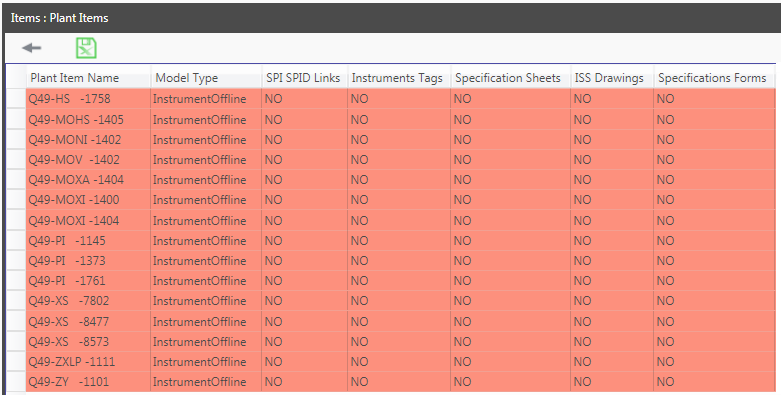
The above grid displays the 15 Instrument Tags along with the relevant rule types. If the item is non-compliant for a particular rule type the word "NO" will be displayed in the cell and the cell will be coloured red. If an item is compliant for a particular rule type the word "YES" will be displayed in the cell.
The user can view the specific passed and/or failed rules for a particular item by selecting "NO" or "YES". For example selecting "NO" in the "Instrument Tags" column and "Q49-HS -1758" row shows all the rules in the rule type for a particular item:
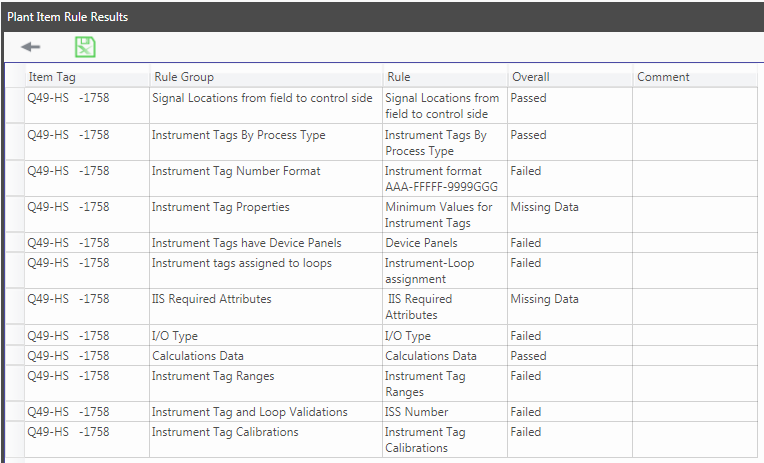
Double clicking on a "Passed" or "Failed" cell displays the detailed rule result in an additional grid. The grid displays each rule item in the rule along with the Property, Result, Expected Result, Status, Notes and References:
