Run Rules
Rules can be run as often as is necessary for the design to be satisfactorily conducted. Rules can be run on the entire Project or one P&ID
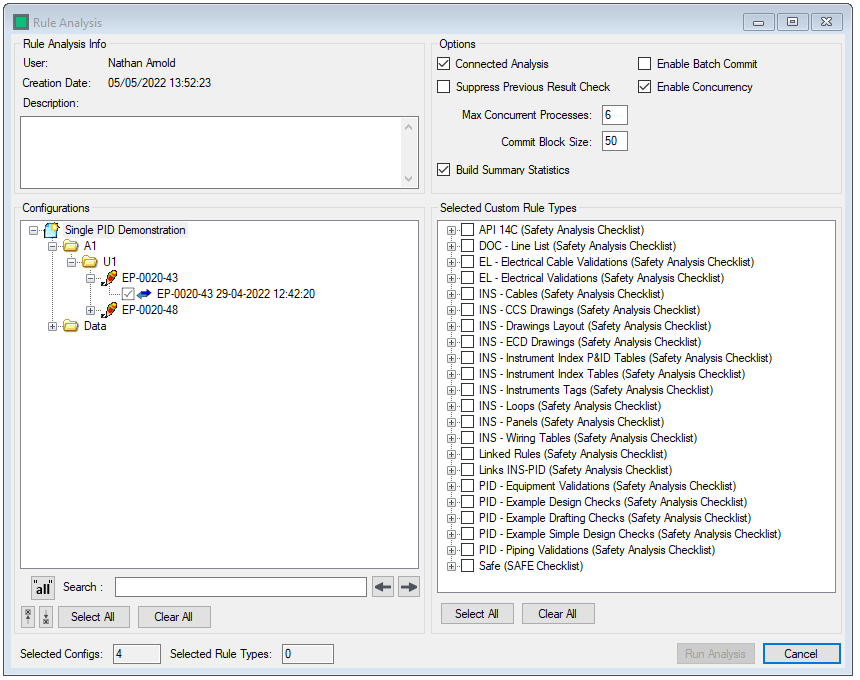
The run rule analysis form is split into three areas.
- Rule Analysis Info
- User - The user who is logged in to run the analysis
- Creation date - The date and time the analysis is created
- Description - A description of the purpose of the rule analysis
- Configurations - Select the desired locations from the Project tree. Use
 to run the analysis on all P&IDs in the Project.
 - Custom Rule Types - Select the desired custom rule types/rule groups that you wish to be applied to the project. Use to run the analysis on all P&IDs in the Project.
- Options
- Connected - Analysis Runs the analysis using the process connections, or not. Running without connections makes the analysis significantly faster, at the expense of all rules using process connections failing.
- Suppress Previous Results Check - Writes all rule results as new if checked
- Enable Batch Commit - Commits the rule results in batches based upon the commit block size if checked.
- Enable Concurrency - Enables the rules to run as a set of multithreaded processes
- Max Concurrent Processes - User defined field for the maximum number of threaded processes for the rules to use
- Commit Block Size - The number of drawings to commit per "chunk" when batch commit is enabled
- Build summary Statistics - When checked, enables the statistics summary to be generated at the end of the analysis, in order to diplay results in the dashboard
Select  Analysis to start the rule analysis
Select  to close the form without running an analysis