Copy Rules
The Copy Rules function opens a separate window allowing user to perform multiple copy types in one operation. Rules can be copied from any Model group and/or Hazid Knowledge Model to any other Model Group and/or Hazid Knowledge Model as well as copied within their originating model. User is able to copy rules between different Custom Rule Types.
The Copy function opens up by default selected to copy within the Model or Group user has selected, and displays the rules available for that model determined by their Rule Type filter.
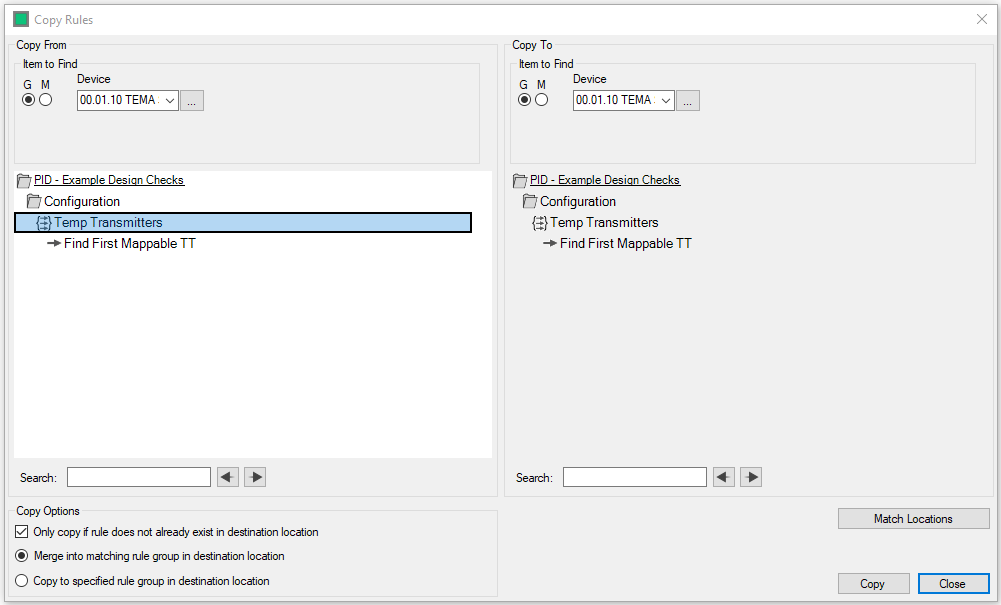
User may change the Item that they wish to copy rules from, by modifying the Item to find within the Copy From and Copy to sections.
- Device Group - Selecting the G limits the device drop down box to be Model Group items only. User can select the
 icon to select from the Model Tree
 - Device Model - Selecting the M limits the device drop down box to be Model items only. User can select the icon to select the from the Model Tree
User can set both the Copy From and To to be the same item at any time by selecting 
The Copy to section is either greyed out or active depending on the options user have set for copy.
- Only Copy if Rule does not already exist in destination folder - Will only copy the rule to the destination if it does not exist in corresponding rule group in the destination. If no rule group matching rule group exists, one will be created during copy
- Merge into matching Rule Group in destination location - Will only merge the rule into the corresponding rule group in the destination. If no rule group matching rule group exists, one will be created during copy
- Copy to specified Rule Group in destination location - Allows user to select a specific rule group within the destination location to copy the selected rules to. A rule group must first exist in the destination location
User may select multiple rules to Copy by using the Shift or Ctrl keys.
Select  to start the copy
Select  to cancel the copy operation