Icon Mapping Rules
Icon Mapping rules allow you to map symbols the Hazid Knowledge Models using symbol properties rather than the direct Icon Mapping.
The Icon Mapping Rules are stored within groups and run in a sequential instruction order where the higher the order in the sequence the higher the precedence of the rule. As such, the Icon Mapping Rules are a "First Rule to run Wins" set of instructions.
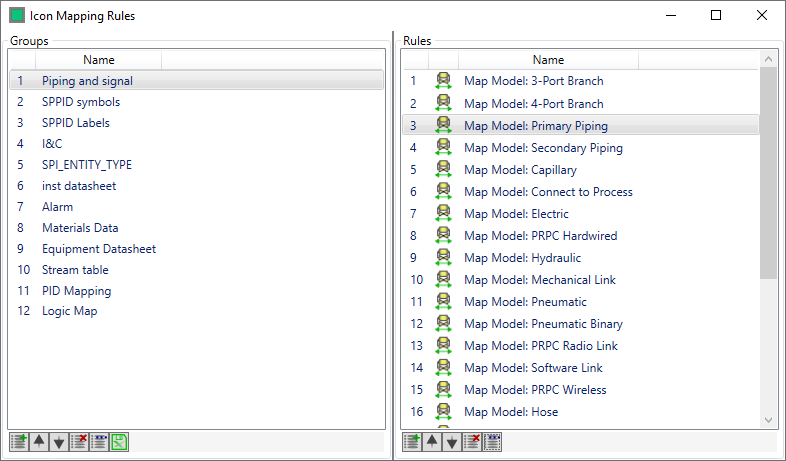
The instruction order consists of the Icon Mapping rules.
To create an Icon Mapping Rule Group, click on the  button at the bottom of the "Groups" panel, this opens the Add Rule Group Window

Enter the name of your Mapping rule group and click  to create it, or
  to close without creating it.
To Create an Icon Mapping Rule select the Icon Mapping Rule Group that you wish to create it in, and click on the button in the "Rules" and see Creating an Icon Mapping Rule
The Rule Group or Rule is created at the bottom of the list and can be entered at the desired location in the Instruction Order by dragging and dropping it to the level in the order you wish or using the  arrows.
To Edit a Mapping Rule or Group select the Rule or Group that you wish to edit and click on the  button in the respective panel.
To Remove a Mapping Rule or Group select the Rule or Group that you wish to edit and click on the  button in the respective panel.
The  button allows you to import a set of Icon Mapping rules from an Excel Spreadsheet to a Group you Specify to create

Define the path of the Excel sheet you with to import with the  button, enter the Group Name that you wish to import to, then click on the
  button to begin the import.