SIL Table Setup
SIL Tables are used to store the Frequencies of Dangerous Failures per Hour and Average Probability of Failure on Demand for use in both the SIL Determination and LOPA within the HAZID Framework Process Safety Product and are created by clicking on the  button, this opens the SIL Table Setup Menu. Selecting a SIL Table and clicking on the
  button will open the SIL Table Setup Menu for the selected Table. Note that a previously created Table has been used for the purposes of this guide.
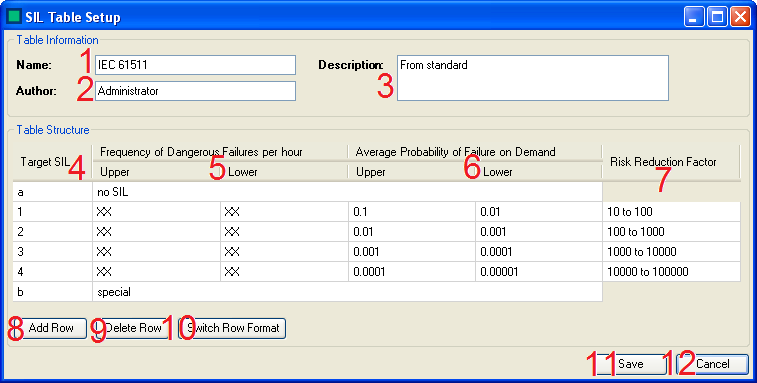
There are several actions that can be carried out to create/edit a Risk Matrix:
- The Administrator enters the Name of the SIL Table here.
- The Administrator enters the Author for the SIL Table here. (If required)
- The Administrator enters the Description for the SIL Table here. (If required)
- The Administrator sets enters the Target SIL level for each row added in this column.
- The Administrator enters the Values for the Upper and Lower Frequency of Dangerous Failures per Hour here.
- The Administrator enters the Values for the Upper and Lower Average Probability of Failure on Demand here.
- The Administrator enters the risk reduction factor data here. (If required)
- The Administrator can add additional Rows to the SIL Table by clicking on the "Add Row" button.
- The Administrator can remove unwanted Rows from the SIL Table by clicking on the "Delete Row" button.
- The Administrator can switch the Row Format using the "Switch Row Format" button there are two row Formats:
- The Standard Row Format - This allows a value to be entered into each cell of a row individually (see row '4' in the diagram)
- The Special Row Format - This combines all of the cells to allow special data to be entered (see row 'b' in the diagram)
- The Administrator can Save the SIL Table Using the Save button.
- The Administrator can Cancel saving the SIL Table/Abandon any changes made to an existing SIL Table Using the Cancel button.
The  button is used to quickly delete a SIL Table. However, deleted SIL Tables are not removed from the database, and can be restored by selecting them and clicking on the
  button.
The  button allows the Administrator to import a SIL Table from the results database.