RPN
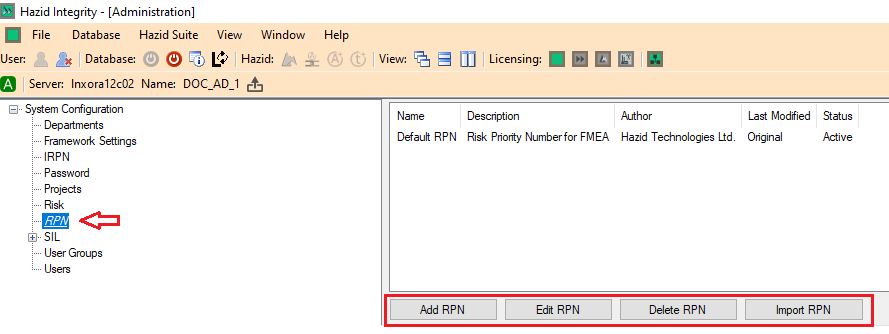
Risk Priority Numbers (RPN) is another method used to determine the SIL of Cause-Consequences within the HAZID Framework Process Safety Product and are created by clicking on the  button, this opens the RPN Setup Menu. Selecting a RPN Chart and clicking on the
  button will open the RPN Menu for the selected RPN. Note that a previously created RPN has been used for the purposes of this guide.
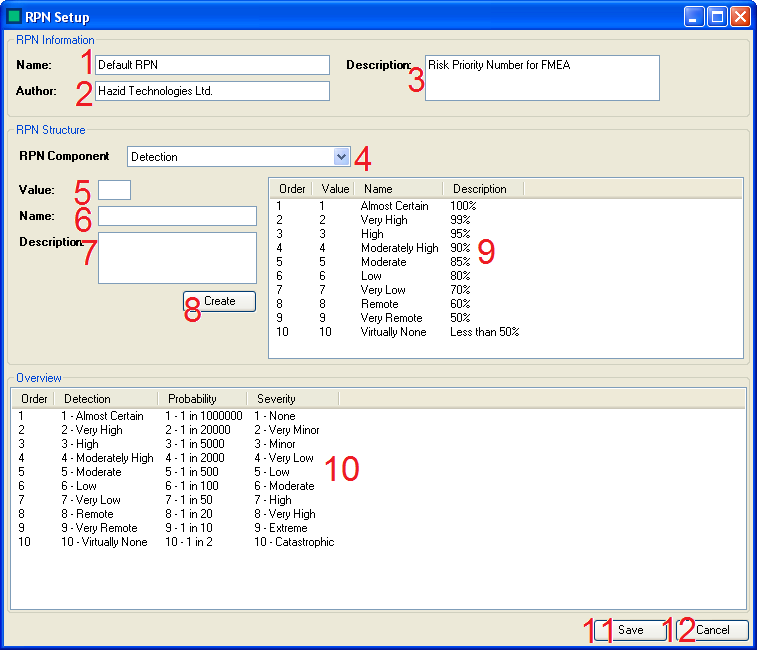
There are several actions that can be carried out to create/edit a Risk Matrix:
- The Administrator enters the Name of the RPN Chart here.
- The Administrator enters the Author for the RPN Chart here. (If required)
- The Administrator enters the Description for the RPN Chart here. (If required)
- The Administrator selects which RPN Component the wish to enter data for from the drop down list.
- The Administrator enters the Value for the RPN here.
- The Administrator enters the Name for the RPN here.
- The Administrator enters the Description for the RPN here.
- The Administrator creates the RPN in the List (9) by clicking on the "Create" button,
- The RPN List - this displays the RPN List for the RP Component Selected in (4)
- The Developed RPN Table - this displays the full RPN table, as it will be used to determine SIL Requirements in the Hazop
- The Administrator can Save the RPN Chart Using the Save button.
- The Administrator can Cancel saving the RPN Chart/Abandon any changes made to an existing RPN Chart Using the Cancel button.
The  button is used to quickly delete a RPN Chart. However, deleted RPN Charts are not removed from the database, and can be restored by selecting them and clicking on the
  button.
The  button allows the Administrator to import a RPN Chart from an existing Hazop study.