Adding a Risk Category
The Add Risk Category Panel is used wherever the Administrator wishes to add a Risk Category to a Risk Matrix
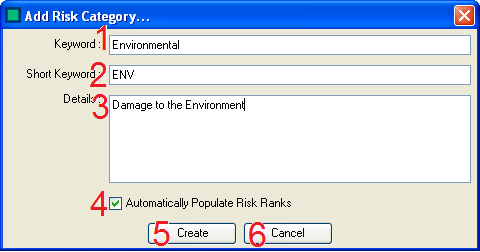
There are several actions that can be carried out to create/edit a risk category:
- The Keyword - Here the Administrator enters the Keyword for the Risk Category
- The Short Keyword - Here the Administrator enters the Short Keyword for the Risk Category
- The Details - Here the Administrator enters the Details for the Risk Category
- The Automatic Population check box - This Check Box allows the Administrator to define whether or not the Risk Ranks are Automatically Populated.
- The Administrator can Create the Risk Category Using the Create button.
- The Administrator can Cancel saving the Risk Category/Abandon any changes made to an existing Risk Category Using the Cancel button.