Adding a Risk Category
SIL Graphs are a method used to determine the required SIL of Cause-Consequences within the HAZID Framework Process Safety Product and are created by clicking on the  button, this opens the SIL Graph Setup Menu. Selecting a SIL Graph and clicking on the
  button will open the SIL Graph Menu for the selected Graph. Note that a previously created SIL Graph has been used for the purposes of this guide.
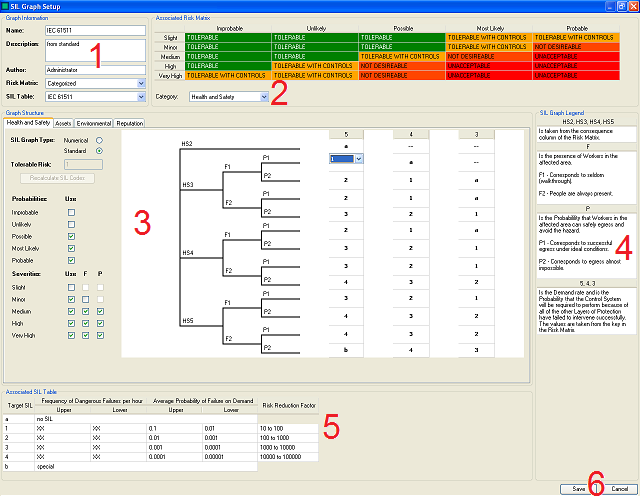
The SIL Graph Setup Menu can be split in to Six Sections:
- The Graph Information - The Administrator enters general information about the SIL Graph here.
- The Associated Risk Matrix - The Administrator can view the Risk Matrix Associated with the SIL Graph here.
- The Graph Structure - The Administrator defines the structure of the graph and the SIL rankings here.
- The SIL Graph Legend - Useful information pertaining the the graph is displayed here.
- The Associated SIL Table - The Administrator can view the SIL Table Associated with the SIL Graph here.
- The Administrator can Save the SIL Graph Using the Save button or Cancel saving the SIL Graph/Abandon any changes made to an existing SIL Graph Using the Cancel button.
The  button is used to quickly delete a SIL Graph. However, deleted SIL Graphs are not removed from the database, and can be restored by selecting them and clicking on the
  button.
The  button allows the Administrator to import a SIL Graph from an existing Hazop study.