SIL Matrix Setup
SIL Matrices are a method used to determine the required SIL of Cause-Consequences within the HAZID Framework Process Safety Product and are created by clicking on the  SILMatrixButton.png button, this opens the SIL Matrix Setup Menu. Selecting a SIL Matrix and clicking on the
  button will open the SIL Matrix Menu for the selected Matrix. Note that a previously created SIL Matrix has been used for the purposes of this guide.
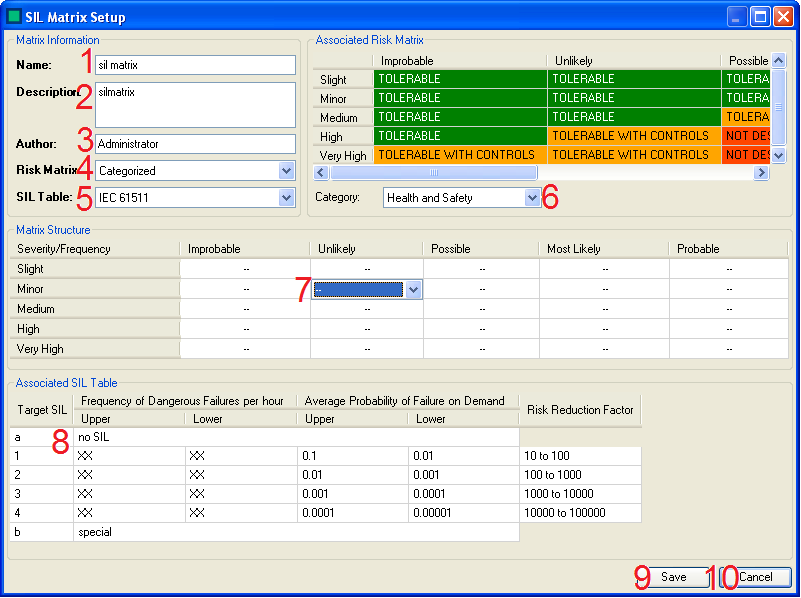
There are several actions that can be carried out to create/edit a SIL Matrix:
- The Administrator enters the Name of the SIL Matrix here.
- The Administrator enters the Description for the SIL Matrix here. (If required)
- The Administrator enters the Author for the SIL Matrix here. (If required)
- The Administrator selects the Risk Matrix that is to be associated with the SIL Matrix being created/amended here.
- The Administrator selects the SIL Table that is to be associated with the SIL Matrix being created/amended here.
- The Administrator selects the category (from those defined when the associated Risk Matrix was created) for which SIL ratings are to be set from this drop down, the associated Risk Matrix (4) is shown above.
- The Administrator sets the SIL value required for each cell here..
- This displayed the Associated SIL Table, selected in (5)
- The Administrator can Save the SIL Matrix Using the Save button.
- The Administrator can Cancel saving the SIL Matrix/Abandon any changes made to an existing SIL Matrix Using the Cancel button.
The  button is used to quickly delete a SIL Matrix. However, deleted SIL Matrices are not removed from the database, and can be restored by selecting them and clicking on the
  button.
The  button allows the Administrator to import a SIL Matrix from an existing Hazop study.