Region Tools
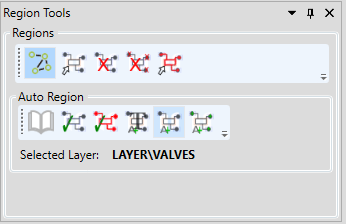
| Icon | Description | Usage |
|---|---|---|
 | Toggle Region Overlay | 1. Toggles the displaying of all regions in the drawing to the colour chosen in the overlay options setting. 2. To allow manual creation of regions by left-clicking and dragging a box around the graphical items to be regioned. 3. When checking a drawing to ensure regioning is correct. |
 | Create Region | Creates a region from the selected graphics |
 | Delete Region | Deletes the selected region |
 | Delete All Regions | Deletes all regions in the drawing |
 | Merge Regions | Merge to regions together and groups the graphics into one object |
 | Open Symbol Library | Opens the Symbol Library Editor |
 | Auto-Create Regions | Will iterate through all graphic objects in the drawing and compare them to the symbols in the symbol library to create a region and identify them |
 | Create & Identify Region | Will compare the selected graphics to those in the symbol library before regioning and identifying them where possible |
 | Add Text to Symbol Library | |
 | Add Symbol To Library | |
| Add Symbol by Model Type to Library |