Attachments
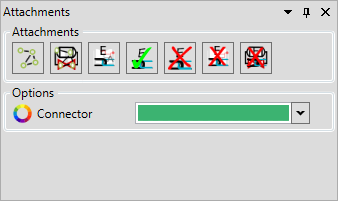
| Icon | Description | Usage |
|---|---|---|
 | Toggle Attachment Overlays | 1. Toggles the attachment lines for all items on the drawing 2. When checking a drawing to ensure attachments are correct. |
 | Show Attachment For Selected | 1. Toggles the attachment lines for the selected equipment 2. When working on a dense drawing and the attachments overlay is too crowded to accurately percieve what is going on. |
 | Run Auto-Attachments | 1. Once auto attachments rules have been verified the majority of attachments will be accurately created. 2. See Attachment Rules for more information. |
 | Attach Selected Equipment | 1. Will attach all equipment to the first selected equipment. (if CanAttach = true or is a pipe) 2. Manually creating attachments if the drawing is unique and automation would take longer. 3. Creating auto attachment rules visually ("Create auto attach" in the options menu must be enabled). |
 | Detach Selected | Removes the attachment between the selected equipment |
 | Detach All Equipment | 1. Removes all attachments from the drawing. 2. When creating attachment rules visually this will allow you to quickly remove all created attachment to ensure the automation works as expected. |
 | Detach All From Selected Equipment | Removes all attachments from the selected equipment. |