Connection Rules
While connectivity can be processed manually, by selecting the items you wish to connect and clicking the Add Connections button in the connections tab of Aurelia, it is expedient to create rules to largely automate the process of connectivity definition.
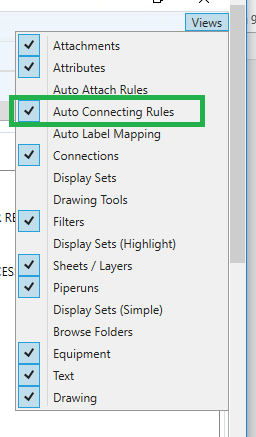
Once the P&ID has opened select “Auto Connecting Rules” from the View Menu
This opens the Auto Connection Rule creation window
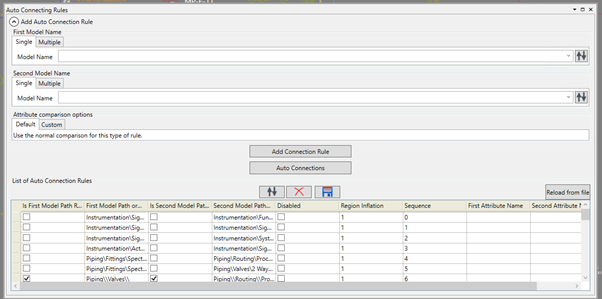
Here you add the item(s) that you wish to enable to connect to each other, you can also edit existing connectivity rules and run the connection rules here.
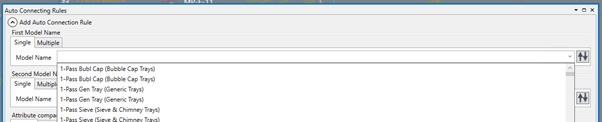
To Add a rule you should define the model(s) that you wish to connect, if you wish to connect a single model, you should select the item in the drop down list under the single tab
If you wish to define a group of models to connect, then select the multiple tab
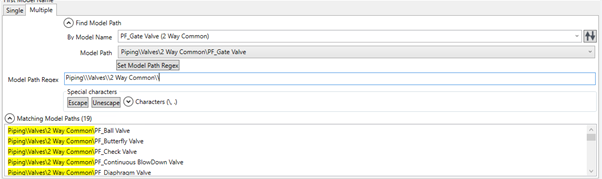
Here you first define a model in the group that you wish to connect, the click the  button to write the path into the regex field, it is then a case of removing the model name and clicking on the
  button to ensure that the path will be correctly interrogated.
Note that you create the connection options for the second item in exactly the same way as the first.
You can also define that a connection can only occur between two items if a given pair of attributes match

Simply add the attribute names and define that their names either match exactly, or by regex (effectively matching anywhere in either name). The options allow connection logic to be changed based upon their selection

- Remove Matching Connection: Inverts the logic, so that when a rule is passed the connection is removed if present.
- Allow double connections: Allows there to be duplicate connections between objects.
Once you have defined your connection, clicking  will add it to the Auto Connection Rule List.

The list is editable, so you can make changes to any rule you have loaded/previously created. Rules can be deleted, saved and reloaded here.
Auto Connection rules are run using the  button. It should be noted that during the configuration phase of a project, you will need to run, clear and revise the connection rules until you are satisfied with their outcomes.