Response Panel
On the right hand side of the Action Home Screen are the Description/Proposed Resolution tab Panel and the Response Panel
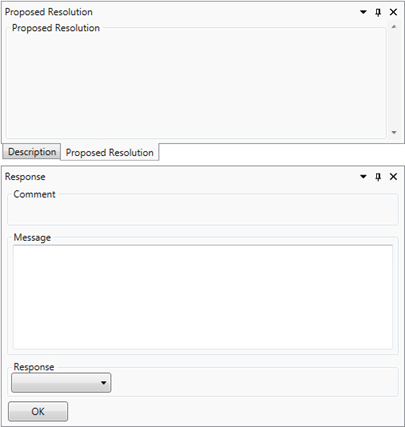
The Description/Proposed Resolution Panel is for information only, and displays the description of the selected action as it was created in one tab, and any proposed resolution associated with the selected action in the other.
The Response panel is used to carry out all messaging and action other action functions

You select your response from the response dropdown, enter a comment for the response and the click the  button. There are several different response options available depending on the status of the action and your user permissions:
- Open - Moves an Actions status to ‘Open’ from New or Closed.
- Approve - Approves the selected action
- Reclaim Approval - Cancels a Previous Approval and returns the action to the User who generated the original approval request
- Close - Closes an acrion
- Delete - Flags an action as deleted in the database
- Message User - Sends a message to the selected user
- Reassign - Reassigns the selected action to a selected user
- Reply to Message - Reply to a received message
- Send for Approval - Sends the selected action for approval
- Reassign Approval - Reassigns the approval of the selected action to a selected user
- Reject - Rejects the approval of an action
- Update - Updates the selected action with a comment from the user