Action Manager
Hazid Workflow Integrity system is an off-the-shelf, configurable resolution tracking solution. It electronically logs, manages, queries, and reports on action items resulting from any area of the Hazid Integrity system.
Hazid Integrity Workflow Integrity helps projects to increase efficiency and achieve faster results by improving visibility and accountability, automating workflow, and escalating items that are falling behind.
Clicking on the  button opens the Hazid Workflow Integrity.
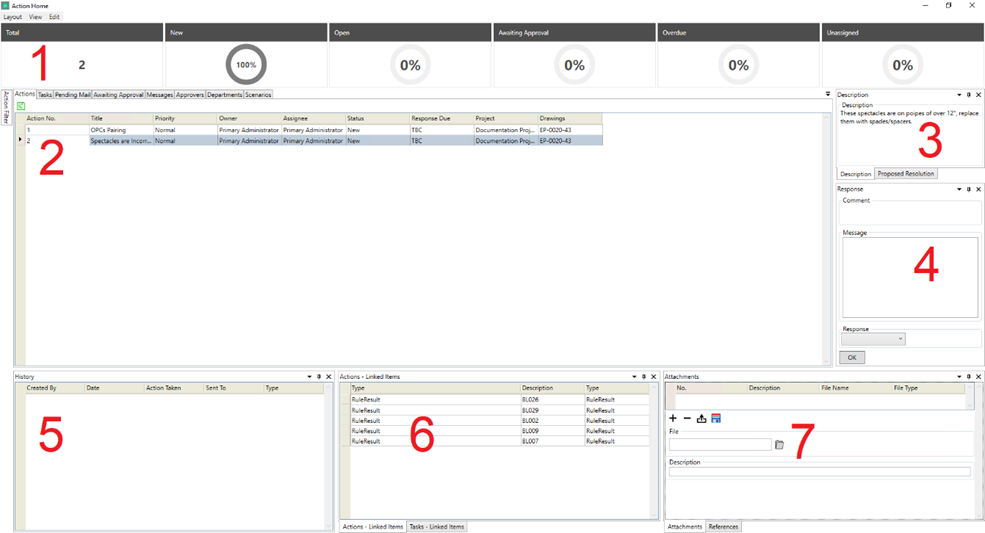
The Action Home Screen has 7 Sections
- The Action Overview – this gives you an overview of the status of all of the actions present in the results database on which you are viewing the actions.
- The Action View Panel
- The Action Description/Proposed Resolution Panel
- The Action Response Panel
- The Action History Panel – All of the history of the action you have selected is shown here
- The Linked Items Panel
- The Attachments Panel
Note that all references to the location of items within the Action Home refer to the default supplied action home layout.