Rotation Attributes
The Rotation Attributes Editor is used to define the rotations of Equipment in order for them to be correctly positioned by the hybrid SPPID drawing creation routine.
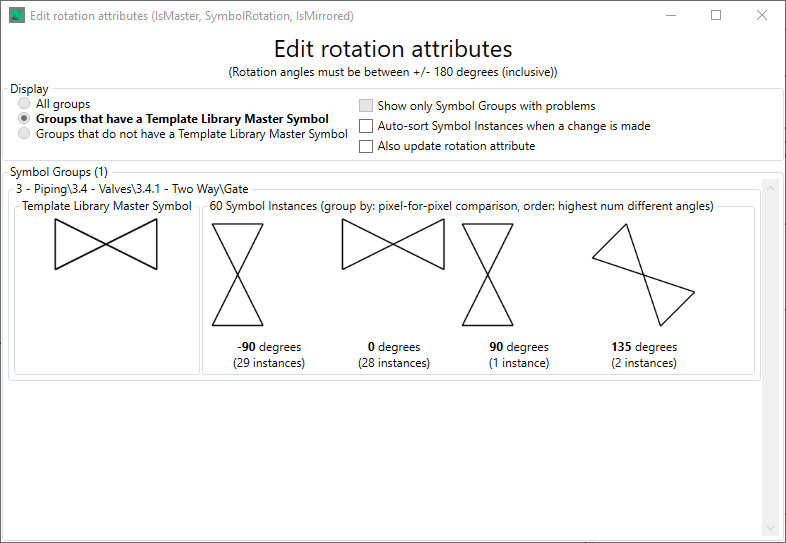
The "Auto-sort Symbol Instances when a change is made" checkbox enables the symbol rotation list shown above to be automatically reordered from -180 to +180 going from left to right when a change is made tto a symbl instance rotation The "Also update rotation attribute" checkbox enables the "rotation" attribute to be updated when a change is made to the "SymbolRotation" attribute.
To change a rotation for a symbol select the symbol instance for which you wish to change the rotation
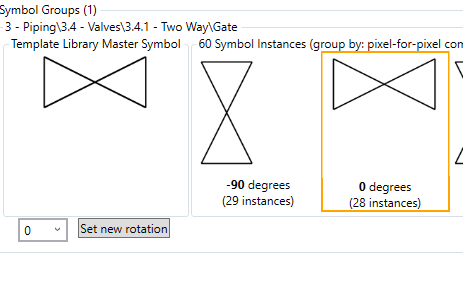
Then enter the rotation you wish the symbol instance to be

And click on the set new rotation button to  your changes.