Batch Processing
The Batch Process Manager allows you to create and administer batches of processes in order to largely automate the conversion/remediation of dumb drawings into fully intelligant engineering data sources.
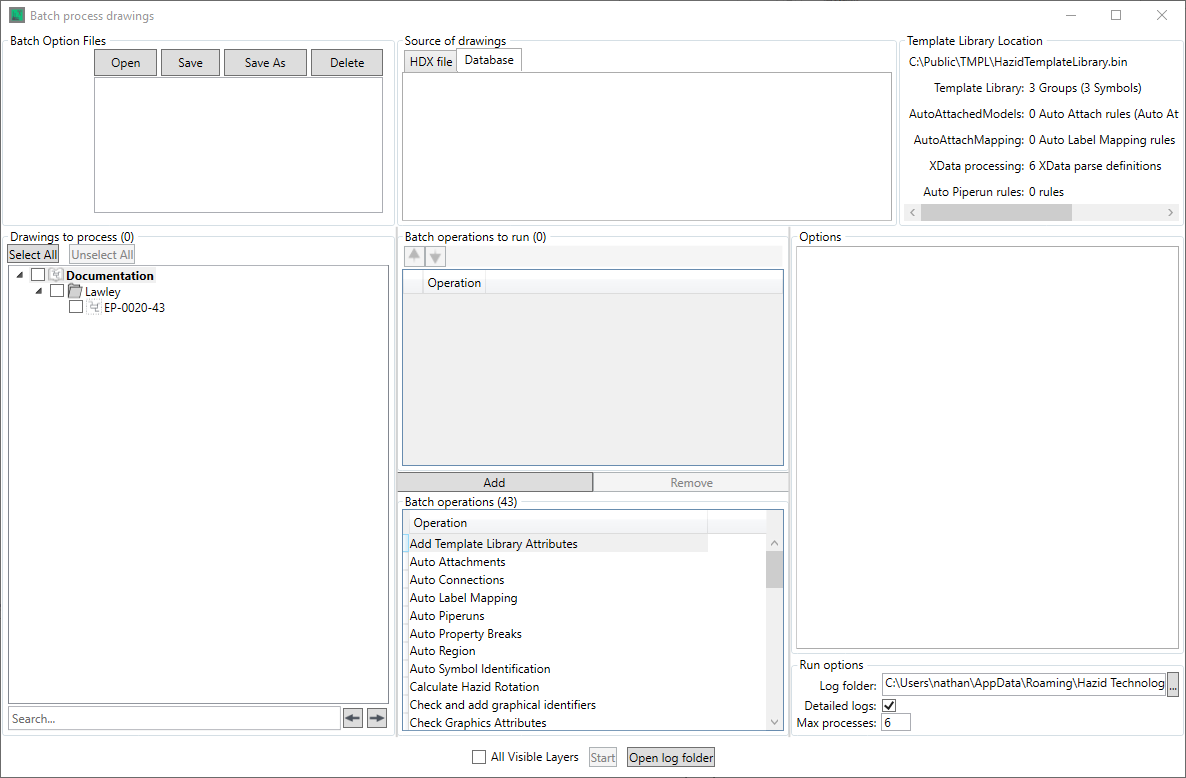
There are seven main sections to the Batch Manager
- Batch Option Files - The Batch file manager
- Source of Drawings - The Drawing Source Manager
- Template Library Location - The Template Library information panel
- Drawings to process - The tree where you select the drawings you wish to process if you are running a batch (batches can be created and saved for future use without having to run them)
- Batch Operations - The panel in which you define which batch operations you wish to run, and the order in which you wish to run them.
- Options - This Panel contains tabs with the batch operation options of those batch operations that you have specified (not all batch operations have tabbed options)
To run a batch, either load a batch file or create a batch operation instruction list, select the drawings on which you wish to run the batch and click the  button.
The  checkbox limits the batch operations to only run on layers that are currently set to be visible in aurelia.
The  button opens the folder location that the logs are defined to be written to