Hub Database Connections Setup
Each client instance of Hazid Integrity can connect to multiple database schema instances required for each module that you will be using. For information on the schema types see Configuration Tool.
To edit the database connections select the Database Connections Icon  .
.
The Database Connection Setup stores all of the connection data for the database users. You will not be able to connect to the schema unless you have the correct Oracle/MSSQL Client installation and can connect to the server and Administrative connection
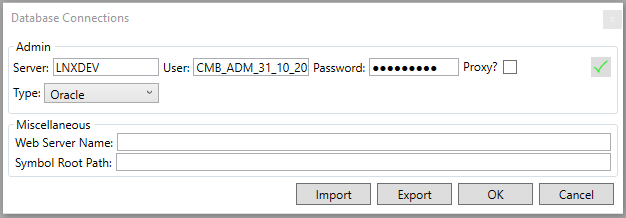
Within the connections settings System connection must always be connected to the Administrative Database where the User you are currently using resides all other connection settings are required only for the modules you require a data connection to. For more Information see Edit Database Connections.
The Miscellaneous settings are to allow your Hazid Integrity client to connect to the web server serving your Workflow Integrity and the Symbol Root Path for SPPID - simply
- enter the name/IP of the webserver
- the UNC path of the SPPID symbol root that you wish to make use of
The Setup Database Connection form also allows you to import a set of database connections from a Hazid .hdb file or to export your current connections. For more Information see Import/Export Connections.